





 HarmonyOS开发|ArkTS UI颜色API通用规则
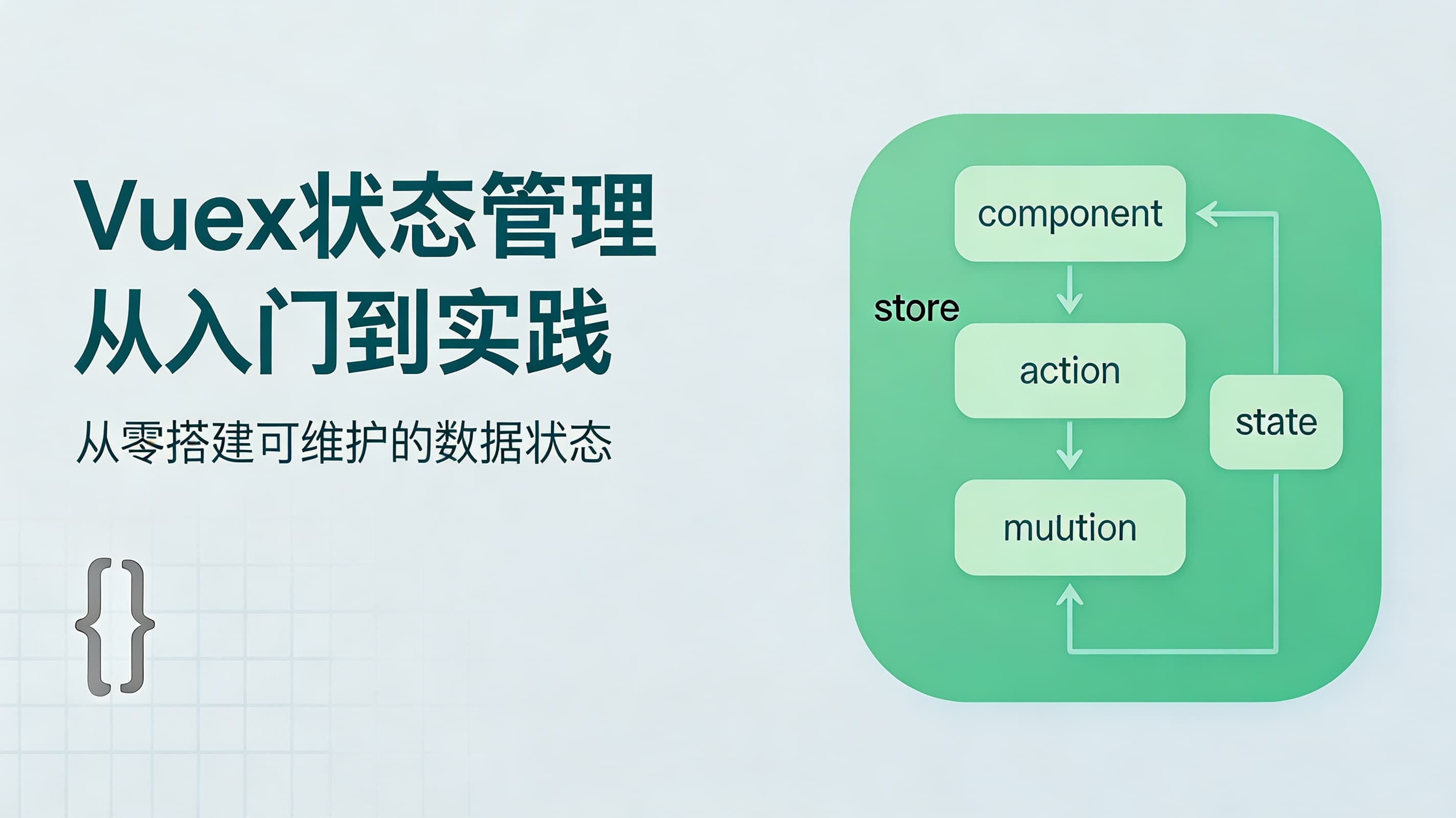
前两天有个读者私信我,说他们在做一个中等规模的项目,组件之间传数据传得头都大了。父传子、子传父、兄弟传值、跨级传值,各种方式混在一起,代码变得特别难维护。我跟他聊了聊,发现他其实需要一个统一的状态管理方案,于是给他推荐了Vuex。
今天我就把Vuex的核心概念整理一下,希望能帮到遇到同样问题的朋友。
一、为什么需要Vuex?
先说说什么时候该用Vuex。我个人觉得,如果满足以下条件之一,就可以考虑引入Vuex了:- 多个组件需要共享同一份数据
- 多个组件需要修改同一份数据
- 数据需要在组件树中跨层级传递
- 数据需要持久化或者有复杂的异步操作
二、Vuex的核心概念
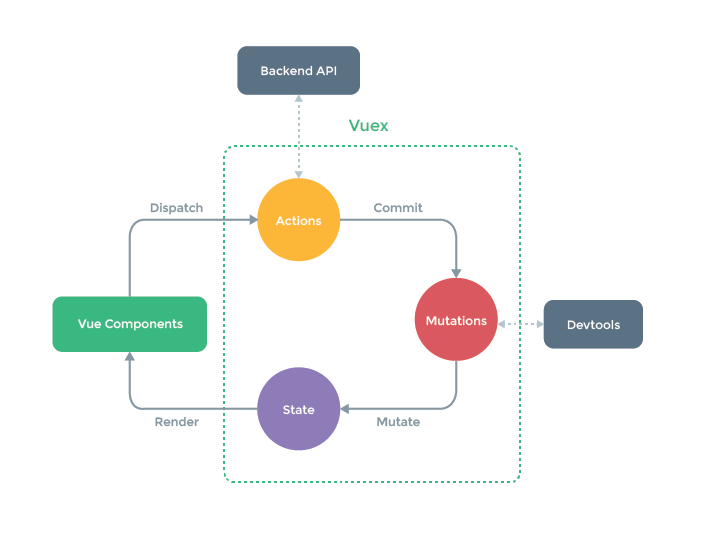
Vuex工作原理图
1. State - 数据源
State就是存放数据的地方,所有组件共享的数据都在这里。
const store = new Vuex.Store({
  state: {
    userInfo: null,
    cartList: [],
    totalPrice: 0
  }
}) 组件里使用state的数据:// 方法1:直接使用
this.$store.state.userInfo
// 方法2:使用mapState辅助函数(推荐)
import { mapState } from 'vuex'
computed: {
...mapState(['userInfo', 'cartList'])
} 2. Mutations - 修改数据的唯一途径重要的事情说三遍:修改state只能通过mutations!修改state只能通过mutations!修改state只能通过mutations!
为什么这么严格?因为Vuex需要追踪每一次数据变化,方便调试和记录。
const store = new Vuex.Store({
  state: {
    count: 0
  },
  mutations: {
    // 每个mutation都是一个函数
    increment(state, payload) {
      state.count += payload
    },
    setUserInfo(state, user) {
      state.userInfo = user
    }
  }
}) 触发mutation:// 方式1
this.$store.commit('increment', 10)
// 方式2:使用mapMutations
import { mapMutations } from 'vuex'
methods: {
...mapMutations(['increment', 'setUserInfo'])
} Actions - 处理异步操作:Mutations只能是同步的,如果有异步操作(比如发请求),就得用Actions。
const store = new Vuex.Store({
  state: {
    userInfo: null
  },
  mutations: {
    setUserInfo(state, user) {
      state.userInfo = user
    }
  },
  actions: {
    // context包含了store的所有方法
    async fetchUserInfo(context, userId) {
      const { data } = await axios.get(`/api/user/${userId}`)
      context.commit('setUserInfo', data)
    }
  }
}) 分发action:// 方式1
this.$store.dispatch('fetchUserInfo', 123)
// 方式2:使用mapActions
import { mapActions } from 'vuex'
methods: {
...mapActions(['fetchUserInfo'])
} Getters - 计算属性:Getters就像是store的计算属性,可以对state进行加工处理。
const store = new Vuex.Store({
  state: {
    cartList: [
      { name: '商品1', price: 100, count: 2 },
      { name: '商品2', price: 50, count: 3 }
    ]
  },
  getters: {
    // 计算购物车总价
    totalPrice: state => {
      return state.cartList.reduce((total, item) => {
        return total + item.price * item.count
      }, 0)
    },
    // 可以传入参数
    getCartItem: (state) => (name) => {
      return state.cartList.find(item => item.name === name)
    }
  }
}) 使用getters:// 方式1
this.$store.getters.totalPrice
// 方式2:使用mapGetters
import { mapGetters } from 'vuex'
computed: {
...mapGetters(['totalPrice'])
} 三、Vuex的模块化
当项目变得复杂时,把所有数据都放在一个store里会非常臃肿。这时候就可以使用模块化:// store/modules/user.js
export default {
namespaced: true, // 开启命名空间
state: {
name: '',
avatar: ''
},
mutations: {
setName(state, name) {
state.name = name
}
},
actions: {
async fetchUser({ commit }) {
const { data } = await axios.get('/api/user')
commit('setName', data.name)
}
}
}
// store/modules/cart.js
export default {
namespaced: true,
state: {
list: []
},
mutations: {
addItem(state, item) {
state.list.push(item)
}
}
}
// store/index.js
import Vue from 'vue'
import Vuex from 'vuex'
import user from './modules/user'
import cart from './modules/cart'
Vue.use(Vuex)
export default new Vuex.Store({
modules: {
user,
cart
}
}) 使用模块中的数据:// 带命名空间的模块
this.$store.state.user.name
this.$store.commit('user/setName', '张三')
this.$store.dispatch('user/fetchUser')
// 使用辅助函数
import { mapState, mapMutations } from 'vuex'
computed: {
...mapState('user', ['name', 'avatar'])
}
methods: {
...mapMutations('user', ['setName'])
} 四、一个完整的购物车例子
光说理论比较抽象,我们来看一个完整的购物车示例:
// store/index.js
import Vue from 'vue'
import Vuex from 'vuex'
Vue.use(Vuex)
export default new Vuex.Store({
  state: {
    cart: [
      { id: 1, name: 'T恤', price: 99, count: 1 },
      { id: 2, name: '牛仔裤', price: 199, count: 2 }
    ]
  },
  getters: {
    totalCount: state => {
      return state.cart.reduce((sum, item) => sum + item.count, 0)
    },
    totalPrice: state => {
      return state.cart.reduce((sum, item) => sum + item.price * item.count, 0)
    }
  },
  mutations: {
    ADD_ITEM(state, product) {
      const exist = state.cart.find(item => item.id === product.id)
      if (exist) {
        exist.count++
      } else {
        state.cart.push({ ...product, count: 1 })
      }
    },
    REMOVE_ITEM(state, id) {
      state.cart = state.cart.filter(item => item.id !== id)
    },
    UPDATE_COUNT(state, { id, count }) {
      const item = state.cart.find(item => item.id === id)
      if (item) {
        item.count = Math.max(1, count)
      }
    }
  },
  actions: {
    // 模拟添加到购物车(可以添加异步逻辑)
    addToCart({ commit }, product) {
      commit('ADD_ITEM', product)
    },
    removeFromCart({ commit }, id) {
      commit('REMOVE_ITEM', id)
    }
  }
}) 在组件中使用:<template>
<div>
<div v-for="item in cart" :key="item.id">
<span>{{ item.name }}</span>
<span>¥{{ item.price }}</span>
<button @click="updateCount(item.id, item.count - 1)">-</button>
<span>{{ item.count }}</span>
<button @click="updateCount(item.id, item.count + 1)">+</button>
<button @click="removeFromCart(item.id)">删除</button>
</div>
<div>
总计:{{ totalCount }}件,¥{{ totalPrice }}
</div>
</div>
</template>
<script>
import { mapState, mapGetters, mapActions, mapMutations } from 'vuex'
export default {
computed: {
...mapState(['cart']),
...mapGetters(['totalCount', 'totalPrice'])
},
methods: {
...mapActions(['addToCart', 'removeFromCart']),
...mapMutations(['UPDATE_COUNT']),
updateCount(id, count) {
this.UPDATE_COUNT({ id, count })
}
}
}
</script> 五、一些实用技巧
1. 持久化存储
刷新页面state就没了,可以把数据存到localStorage:
// 在store初始化时从localStorage读取
const savedData = localStorage.getItem('vuex_state')
const state = savedData ? JSON.parse(savedData) : {
  cart: []
}
// 监听state变化,保存到localStorage
store.subscribe((mutation, state) => {
  localStorage.setItem('vuex_state', JSON.stringify(state))
}) 2. 严格模式const store = new Vuex.Store({
// ...
strict: process.env.NODE_ENV !== 'production'
}) 3. 插件Vuex支持插件,可以做一些日志记录、数据持久化等操作:
const myPlugin = store => {
  store.subscribe((mutation, state) => {
    console.log('mutation:', mutation)
    console.log('state:', state)
  })
}
const store = new Vuex.Store({
  plugins: [myPlugin]
})